Showing posts with label Guides. Show all posts

Sunday, October 2, 2011

HAF case


I recently got a new case for myself the its a Cooler master HAF case, I really like the fact that you can easily hide the wires inside of it, the power supply is also on the bottom. The air flow in the case is remarkable compared to my old case. Wish I had  got one sooner. I also like the Hard drive tray they use its simple to exchange drives quickly.


It also came with two 120mm fans installed and I installed two more and a fan controller.

Wednesday, September 21, 2011

Dusty System

It always seems that whenever someone asks me to look at a computer its usually a complete mess inside as far as dust and pet hair, A clogged up heat sink can fry your system quick and it also makes cool popping sounds.

Needless to say if money is no object to you then don't worry about cleaning out your computer however if you are frugal like me then you should try and clean your computer out once a month or so. The compressed air works great or a shop vac with the hose reversed to blow air (be mindful not to get to close) this one was just dropped off to me this evening but i believe its got more serious problems than some dirt.

Saturday, May 29, 2010

NAS Server

I found a new program Freenas based upon free BSD that allows you to use an old computer for network storage. It uses hardly any resources you can set it up as a headless server and hide it away in a corner someplace. It took very little time to set it up and get it on line. I have a lot of old hardware sitting around and was going to get another portable hard drive so I thought I would try this and save myself some money. So far so good the firewall seems simple enough as well.This is the web interface to set it up from another computer.


Sunday, March 14, 2010

Slideshow Wallpaper

Here is a real simple XML script I changed around a little to fit my needs and I thought I would share, If you get sick of your wallpaper and would like it to change through out the day this script will do just that, it changes about every 30 minutes right now.I have only tried this with Gnome I am not sure how it will work with KDE it should be ok. If anyone tries this on KDE let me know. I have tried with Ubuntu and Mandriva also.


It will do 9 different wallpapers the way it is right now and you can add or remove as many as you want, all you must do is follow my example {/home/file#.jpg} you must be sure at the end you loop back to the first image in your show. what you need to do is create a folder where you plan to save them and put all the images there to begin with, then direct the script where to find them {/home/file.jpg} when you are done this save as an XML file in the same folder. now go to your desktop and right click and select background, then ADD and select the XML file.You can also go to System in the taskbar and preferences and appearance.

Wednesday, December 23, 2009

Tweak UBUNTU

I use Ubuntu on my main computer and recently found this program to tweak Ubuntu.

It works very good and has a lot of options that a newbie would have to hunt around for.Here is the download site. It is designed for the GNOME desktop environment so KUBUNTU users will have to still do things the old fashioned way. Be sure you back anything up that is important to you before you use this the first time as well since there are some options that could allow you to change important settings. It does make you enter the root password and give you warnings before entering areas that allow changing important settings. There is a large list of 3rd party software available that saves a lot of time on a fresh install.

Saturday, November 28, 2009

Free Anti Virus Programs

Problem solved, With the virus from yesterdays post that is, {NOTE: this laptop is running XP Media Center} the laptop I have been working on was severely infected with numerous virus's I managed to get most of them off but finally talked the owner into letting me do a factory restore after I salvaged their personal files and scanned them. The problem they had was their Virus protection had run out and they didn't bother doing anything about it until the laptop was so bogged down with Malware and virus's it would hardly turn on. I don't understand why someone would let something like that go so long there are enough free virus protection programs like AVG and AVAST that one could use. So if you use windows make SURE you have some sort of anti virus enabled even if its just a free version its better than nothing and could save you some money in the long run.
This is another example of why I use Linux and only Linux.

Tuesday, October 6, 2009

Blog Exposure

With Entre-card's new paid ad situation I am sort of in limbo as to keeping it or not so I have spent a lot more time making use of Adgitize the last week or so. What I have noticed is a slight increase in traffic.My biggest problem has always been that I like to read and I always find myself reading instead of dropping. Thats a whole different story for another day, anyhow What I noticed is that I still see most of the same blogs I normally drop on each day so for now I will just let the Entre card widget stay and do my drops while clicking through the adgitize links.

Friday, August 14, 2009

Terminal Screensaver


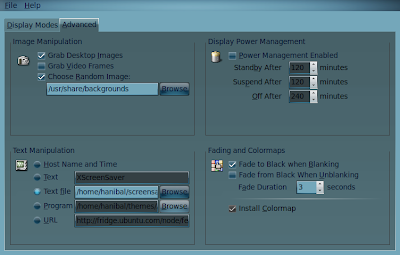
This is How to make a screen saver in UBUNTU that looks like a running terminal program the easy way.

First of all you want to make sure you have Xscreensaver-data and Xscreensaver-data-extra.

If not you can simply paste this code in a terminal. Or go to synaptic package manager.


----------------------------------------------------------

Sudo apt-get install xscreensaver-data


sudo apt-get install xscreensaver-data-extra

----------------------------------------------------------

Now you will want to go to the menu bar and select (system,preferences,screen saver) now select Phosphor if you go to advanced you will see you can choose a simple text file to use for your scrolling text to simulate a terminal program running. I just made my own with my text editor and saved it as a text file. Any type of text will work so you can pretty much customise it any way you wish.Good luck and enjoy.


Thursday, August 13, 2009

Entre Dropping

This is how I do my Entre Drops, I have a 22" wide-screen next to a 19" wide-screen and since I have two blogs and linked them in Entre card I can log into one on each computer and drop on both linked blogs at the same time. I usually load one and while its loading I will drop on the others then switch back.

Sunday, July 19, 2009

One Shitty Computer

Now we have all had dust and things in our computers and I have even showed you one here. This one just took #1 for my shit list of 2009 I do have to hand it to DELL because it still runs it might be a little slow but it boots. I have seen computers in Automotive garages that are cleaner than this I even had to network one at a local sewer plant and it didn't have any shit in it (pun intended) I guess its since I like to keep my computers pristine.
I am not real sure what the stuff in the lint is and I really don't want to. I had thoughts of taking the air compressor to this but then I remembered what happened last time I tried that it did a motherboard in.

Saturday, June 27, 2009

Fading Windows

Here is a screen shot of the fading windows with compiz animations enabled, There are several different types of fades you can choose to display or not display. I choose the random output so they are different each time I open or close something.

Tuesday, June 9, 2009

Personal Weather Station

I have a La cross personal weather station, I built a computer just for it also. I had been running windows on it since the software that it came with was for windows, well I started using Weather display a while back and had tried to compile it to Linux a number of times never having any luck until yesterday when I found another How To on it.
Now I only have one computer running Windows "sort of" since its a networked DVR .

Sunday, May 24, 2009

Browser Usage

I have been following the usage of browsers on Googles Analytics and Was not suprised to see Firefox in the lead , but i was suprised to see such a low number of Internet Explorer users, This is only from the last couple of days so it could change if i give it some more time.


1. Firefox

398 79.76%

2.Chrome

49 9.82%

3. Internet Explorer

24 4.81%

4. Safari

14 2.81%

5. Opera

11 2.20%

6. Mozilla

2 .40%

7. Konqueror

1 .20%

Sunday, May 17, 2009

Ubuntu only Reports 1000 MHZ

I have an AMD Athlon X2 64 6000+ and it wasn't throttling up past 1000 MHZ so after reading a lot and some experimenting I found the solution.

This will tell you your current MHZ
cat /proc/cpuinfo | grep "cpu MHz" | head -n 1

This code will tell you all the possible MHZ frequencies your CPU supports


cpufreq-info
As it turned out cpu freq was not installed on mine so I had to install it.

sudo apt-get install cpufrequtils

Now when I use the CPUfreq-info command I get the correct stepping for my CPU.
You can also add CPU freq to your panel as an applet by right clicking on your panel and selecting it from the drop down list.

CPUs which need to switch frequency at the same time: 0 1
hardware limits: 1000 MHz - 3.10 GHz
available frequency steps: 3.10 GHz, 3.00 GHz, 2.80 GHz, 2.60 GHz, 2.40 GHz, 2.20 GHz, 2.00 GHz, 1.80 GHz, 1000 MHz
available cpufreq governors: conservative, ondemand, userspace, powersave, performance
current policy: frequency should be within 1000 MHz and 3.10 GHz.
The governor "ondemand" may decide which speed to use
within this range.
current CPU frequency is 2.40 GHz.
cpufreq stats: 3.10 GHz:2.25%, 3.00 GHz:0.64%, 2.80 GHz:0.32%, 2.60 GHz:0.42%, 2.40 GHz:0.40%, 2.20 GHz:0.32%, 2.00 GHz:0.32%, 1.80 GHz:0.42%, 1000 MHz:94.92% (33)

Sunday, May 3, 2009

One dirty Computer

One of my sons friends brought his computer over said it wouldn't boot? Just a black screen.

I have seen some dirty computers in the past but this one ranks up there with the worst of them, it was pegging the HW monitor out and shutting down.

Not to mention its one of the E-machines I think the E is short for (environmental waste) since they are sort of a disposable computer.after a large blast of air its on its way.

Wednesday, April 29, 2009

New Cooling

The stock fan and heat sink on my Intel CPU wasn't cooling enough so I decided to get a new one, after some research I found this one It had a 5/5 rating on this site and the small price of it made it that much better. I installed it today and to my surprise it dropped my idle temps by 7-9 degree's. The Heat sink is HUGE I am lucky I have enough room for it. I haven't over clocked it as of yet since the stock heat sink was so bad but this weekend I may try and bump it up a little to see how well this set up works. right now I have about 40% load on both cores and my temps are about 35 C where they were running about 43 C before.

Friday, April 24, 2009

Raidmax Case

My new case came today a Raidmax smilodon, of all the systems I have put together this case stands out I highly recommend this case.
It came with instructions in English that I could actually use and understand not to mention the packaging they did with it could withstand all the abuse UPS can give it. Th case itself is awesome since the sides fold down to get to everything it reminds me of a server the way its simple to access everything.
The case is very well made 28 pounds empty so after you get all the goodies inside it, it can be rather heavy. I got this because my old case was poorly ventilated, the temps have dropped about 8 degrees Celsius, I even tried to get it to get it hot running all the graphics I could and it never went much above 45 C.

Tuesday, April 21, 2009

Over Heating

Well my computer started acting up the other day, I had noticed a difference in it as the temperatures outside warmed up it had started acting up and over the weekend I was watching a movie on it and it came to an abrupt halt. well after a few minutes when it did allow me to reboot I went right into the bios settings to the hardware monitor and noticed it was about 48 C. I had put this computer together back in February and it never much went above 38C-39C so I began researching it and made sure it wasn't full of dust. After finding no dust inside it I rebooted it without the side cover and duplicated what I was doing before and had no problems. The case I have is a cheapo Antec and it doesnt have a lot of room for extra fans or many vents so I ordered a new Raidmax case.
This case has lots of room for extra fans and such and the reviews other have left sound pretty good so I am hoping that will solve my problems and I can once again close my computer up. My wife says this is only an excuse to get a new case.

Sunday, April 19, 2009

XBMC Media Center

I have just Installed XMBC on my Ubuntu system this morning and it works without a hitch, I have used Microsofts media center before but the Open source version tops it.


It is real simple to install with Ubuntu and there were only a few local setting to adjust for the weather and file locations. You can get it HERE
Be sure and read through this and install all you repositories,

If you are up for a big change you can download the new version of Sabayon if you look through the downloads and find the ones ending in MCE they have XBMC included., Here is a screenshot of Sabayon in action.