Showing posts with label UBUNTU. Show all posts

Monday, October 3, 2011

Ubuntu 11.04

So today I made the jump and updated to Ubuntu's Natty release I will admit I did my research on it and tried the live cd first and was a little concerned with the Unity desktop but I updated anyhow.


I used it with the Unity desktop for a few hours and then reverted back to Gnome, I then discovered that I had become accustomed to Unity and for some strange reason It appeals to me.Now i'm sure its not for everyone and you do have the option of switching to the classic look on the login screen.
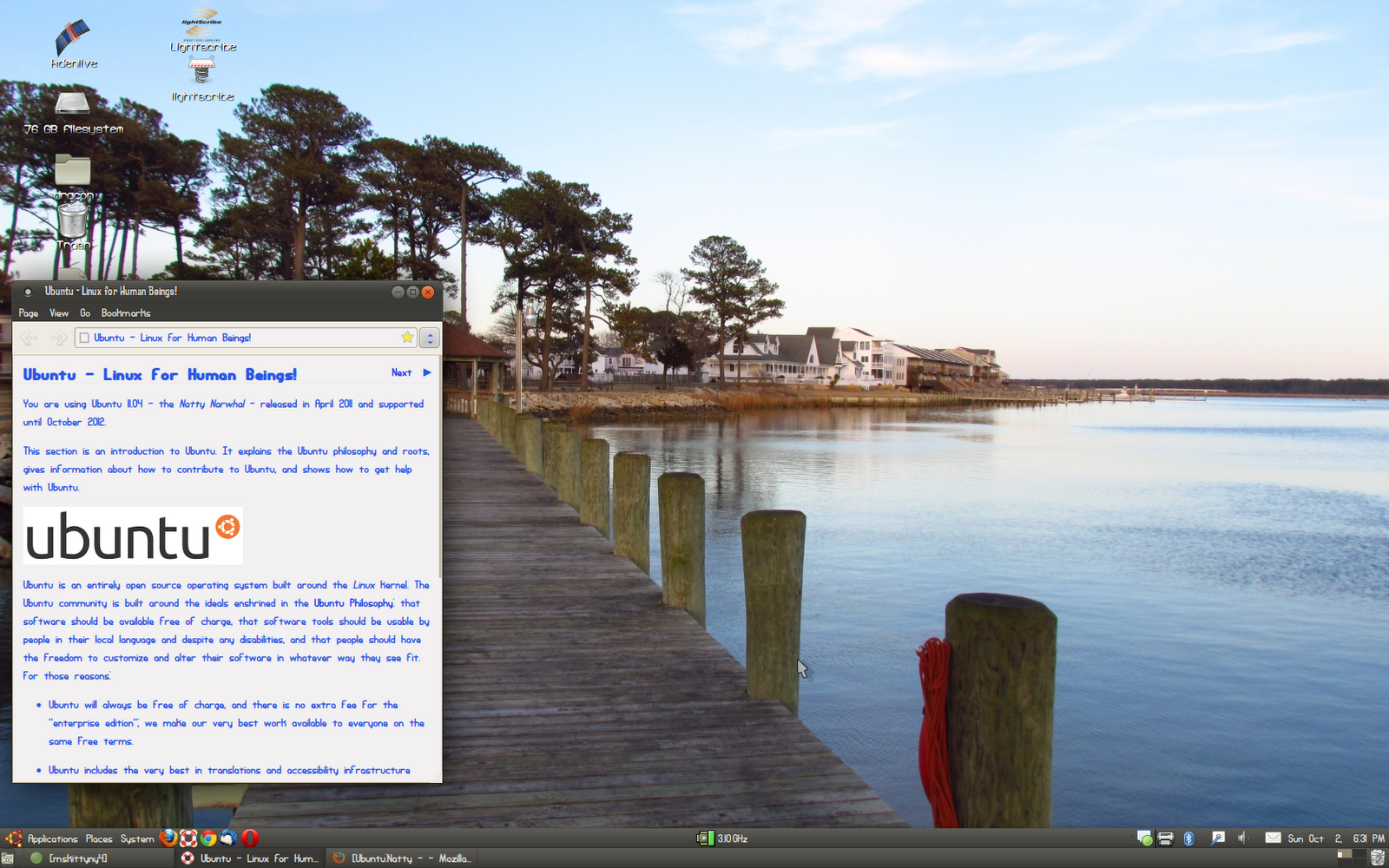


Here is a great page with a lot of useful tips for anyone who decides to try for themselves. I am going to stick to the Unity desktop for a while and I will do a follow up post. I am also installing it on a family members computer this coming weekend, she is using Mandriva at the moment but wishes to try Ubuntu.

Monday, July 18, 2011

Extended Terminal

For those who love using a terminal to do things as I do this is a "must have" I try to use the terminal for installs and updates just because I have been using Linux exclusively for about 10 years I think, and back in the days of Red Hat and such the terminal was your best friend. 

Byobu has a lot to offer and it shows you some good information.

Saturday, December 18, 2010

3gp Video Coversion

I recently was in need of converting a video to 3GP format so I was able to play it on my HTC tp, Now there are a lot of programs for doing this in a windows environment and I even have one however I wanted to find a way to do it running Ubuntu. I was able to do it with Pitivi This program actually does a whole lot and I was very impressed with it. I was able to load it from Synaptic package manager.


This video is all ready in 3GP format but I only loaded it for representation.

Sunday, March 14, 2010

Slideshow Wallpaper

Here is a real simple XML script I changed around a little to fit my needs and I thought I would share, If you get sick of your wallpaper and would like it to change through out the day this script will do just that, it changes about every 30 minutes right now.I have only tried this with Gnome I am not sure how it will work with KDE it should be ok. If anyone tries this on KDE let me know. I have tried with Ubuntu and Mandriva also.


It will do 9 different wallpapers the way it is right now and you can add or remove as many as you want, all you must do is follow my example {/home/file#.jpg} you must be sure at the end you loop back to the first image in your show. what you need to do is create a folder where you plan to save them and put all the images there to begin with, then direct the script where to find them {/home/file.jpg} when you are done this save as an XML file in the same folder. now go to your desktop and right click and select background, then ADD and select the XML file.You can also go to System in the taskbar and preferences and appearance.

Sunday, January 24, 2010

Switch between Terminal and Gnome

I have had some people ask me how to quickly switch to a terminal from within Gnome and back again, well UBUNTU has a shortcut you can do this with F1-F6 will get you a terminal and F7 will return you to your X-server if you left it intact.
If for instance you are updating your graphics driver or anything and you need to Kill the X-server you can do so in UBUNTU by typing

sudo /etc/init.d/gdm stop

Also another neat thing some people don't know about the terminal in Linux is when you are typing in a file name if you are in the right directory and type the first letter of the word and click Tab it will appear remember Linux is case sensitive as well. Some times it will also give you a lot of choices as well.

Wednesday, December 23, 2009

Tweak UBUNTU

I use Ubuntu on my main computer and recently found this program to tweak Ubuntu.

It works very good and has a lot of options that a newbie would have to hunt around for.Here is the download site. It is designed for the GNOME desktop environment so KUBUNTU users will have to still do things the old fashioned way. Be sure you back anything up that is important to you before you use this the first time as well since there are some options that could allow you to change important settings. It does make you enter the root password and give you warnings before entering areas that allow changing important settings. There is a large list of 3rd party software available that saves a lot of time on a fresh install.

Sunday, December 13, 2009

Epson Printers & Scanners

I have an Epson all in one printer scanner, I have used it with Ubuntu before and I remember I had a hard time ever getting the scanner to work right with Xsane. Today I happened to be reading something on a message board "not even sure what one now" but I opened a link telling about Drivers for Epson printers so I  looked and low and behold there was my scanner listed. I had never hooked it back up to my linux system since my last Upgrade to Karmic Koala. So I hooked it up and downloaded the driver specified for my model it said a dependency wasn't met so I made a quick stop by here and downloaded the missing file.  I was surprised to see that everything worked as it should and much better than it did the one other time I had it hooked up on here. Thats one less reason to keep that one computer of mine running Windows! It just kind of sits there now until someone needs to do something that requires a Windows environment. Thats not very often anymore, Both my boys use Ubuntu on their computers as well as me.

Adblock Plus

I use Firefox and Opera web browsers well today Firefox said Ad-block had an update to which I allowed. Well after it was done and Firefox restarted I noticed that its now blocking all Google ad's even on my own blog so I had to play around and tell it to allow ads on some of the pages that I use it even blocked content on my Ad sense login page. So I suppose if you dont want to see any ads its a rather good thing. I guess I know its doing its job anyhow. If you are having the same problems you can adjust it in the preference's after right clicking on the ad-block stopsign up in the right corner of Firefox.

Friday, November 27, 2009

Fighting A Virus

I have been working on a laptop since yesterday that was severely infected with to many virus's to list, I was unable to wipe it due to personal things on it they didnt want to loose, needless to say (did I mention I HATE WINDOWS) after running 3 Live cds DR web , Kaspersky and Bit-defender, I managed to remove all the virus's but networking was disabled and I removed all adapters and reinstalled them several times. I was still unable to get the laptop to get a IP from the DHCP host.
 I even used the winsock repair tool here, and I still have yet to get a connection. I think a format is in order.

This is a good tip for any windows users with connectivity issues.

system still gets an IP address within the 169.254.x.x range after the registry value "IPAutoconfigurationEnabled" has been set to 0 for the LAN adapter

registry key: HKLM\SYSTEM\CurrentControlSet\Services\Tcpip


a. Click Start, and type cmd in the Start Search box to open Command Prompt.
b. Type: ipconfig /all


It didn't do the trick for me however in certian instances I can see it would be useful.In my situation here something is still hiding out on this thing and changing everything I do on every reboot.  As for me I will stick with LINUX

Tuesday, November 17, 2009

Gimp


I was bored and started messing around with Gimp, every time I do I find more useful things I can do with this program. You can really alter an image with this powerful program and even make your own images from scratch.

Sunday, November 15, 2009

Compiz Fusion Icon

Today I found that there is an Icon for Compiz Fusion for the taskbar, It integrates your desktop managers and other settings into one place to quickly change things.


To install it in Ubuntu open a terminal and insert this code
 
sudo apt-get install fusion-icon
 

Thats it, I like it because its simple and I dont have to open 3 other windows to change settings. I hope someone else finds this useful as I did.

Monday, November 9, 2009

Compiz

Compiz works excellent with the newest Ubuntu. I remember a few years ago how complicated and hit or miss it used to be setting it up and to tweak it just the way you wanted it. Now it just works plain and simple. Maybe someday Microsoft will get the picture that writing proprietary code is senseless, with proprietary code you must write new code for every new piece of hardware whereas open source allows you to build on code thats all ready written. Open source also allows anyone to alter and redistribute the software, so basically open source is written the way USERS want it not the way software vendors want it. Look at Vista for example yup pretty but doesn't work so good, you can put lipstick on a pig but its still a pig underneath. GNU


Tuesday, November 3, 2009

Ubuntu Karmic Koala

Ok last night I was having issues with my system after updating my Ubuntu, well it seems there was a possible compatibility issue with my system after the update. It seems firefox was not playing nice with the flash player and this morning It crashed and I was forced to do a clean install. I suppose it was for the better since I have noticed everything seems ok now and actually see some differences I had not seen after the upgrade. I never did find out what exactly caused the system to crash except reference to a theme I had installed panicked. All in all it is a lot better in my opinion. I am using Opera web browser for a lot of things though just until I am sure i have all the bugs worked out.

Monday, November 2, 2009

Firefox 3.5


I update my Ubuntu the other day to the Karmic Koala and it updated my Firefox to 3.5. I thought all was well but I have noticed its much slower than the 3.0.11 i previously had, it also seems a little buggy it has crashed a few times, now I am not sure if this is a Ubuntu issue or Firefox issue I need to read into my log files a little deeper.


 As for now I will use Opera since its much more stable and a whole lot faster, I thought I was using Internet Explorer for a while there. As for the upgrade of my Ubuntu I like everything so far and there hasn't been any disastrous crashes as of yet. The home networking is much less complicated than it used to be.
Ok its the NP-viewer error once again
(npviewer.bin:3239): Gdk-WARNING **: XID collision, trouble ahead
(npviewer.bin:5072): Gdk-WARNING **: GdkWindow 0x460009d unexpectedly destroyed
The program 'npviewer.bin' received an X Window System error.
This probably reflects a bug in the program.
The error was 'BadWindow (invalid Window parameter)'.
(Details: serial 1449 error_code 3 request_code 18 minor_code 0)
(Note to programmers: normally, X errors are reported asynchronously;
that is, you will receive the error a while after causing it.
To debug your program, run it with the --sync command line
option to change this behavior. You can then get a meaningful
backtrace from your debugger if you break on the gdk_x_error() function.)

 So I will have to ditch Flash player or see if i can find a fix somewhere. It seems it also pegs the cpu to 100% when it does this.


Tuesday, October 27, 2009

GTK2 Themes

I found this theme today on Gnome Look its called Copper Deck it is really well done, here are the icons as well so far this theme has integrated well with my system and everything seems to display correct.


Also Thursday the 29th Ubuntu release's  Ubuntu 9.10 it is said to me more user friendly and they have removed some annoyances such as inconsistent naming or poorly organised application choices, there is also a new software center.

Monday, October 26, 2009

Widgets

Here is a really useful widget for Superkaramba called Automatik . I personally like it because it works very well with dual core cpu's and I didn't have to install anything extra on Ubuntu to get it to work, as long as you have sensors and KDE installed. I like to play around with all the different Themes and stuff on KDE look.


Friday, August 14, 2009

Terminal Screensaver


This is How to make a screen saver in UBUNTU that looks like a running terminal program the easy way.

First of all you want to make sure you have Xscreensaver-data and Xscreensaver-data-extra.

If not you can simply paste this code in a terminal. Or go to synaptic package manager.


----------------------------------------------------------

Sudo apt-get install xscreensaver-data


sudo apt-get install xscreensaver-data-extra

----------------------------------------------------------

Now you will want to go to the menu bar and select (system,preferences,screen saver) now select Phosphor if you go to advanced you will see you can choose a simple text file to use for your scrolling text to simulate a terminal program running. I just made my own with my text editor and saved it as a text file. Any type of text will work so you can pretty much customise it any way you wish.Good luck and enjoy.


Saturday, June 27, 2009

Fading Windows

Here is a screen shot of the fading windows with compiz animations enabled, There are several different types of fades you can choose to display or not display. I choose the random output so they are different each time I open or close something.

Friday, June 26, 2009

Compiz


This is one reason why I love LINUX over Windows hands down, I remember when compiz was first launched and was buggy and had to played with to get it just right, now it just plain works.

Sunday, May 17, 2009

Ubuntu only Reports 1000 MHZ

I have an AMD Athlon X2 64 6000+ and it wasn't throttling up past 1000 MHZ so after reading a lot and some experimenting I found the solution.

This will tell you your current MHZ
cat /proc/cpuinfo | grep "cpu MHz" | head -n 1

This code will tell you all the possible MHZ frequencies your CPU supports


cpufreq-info
As it turned out cpu freq was not installed on mine so I had to install it.

sudo apt-get install cpufrequtils

Now when I use the CPUfreq-info command I get the correct stepping for my CPU.
You can also add CPU freq to your panel as an applet by right clicking on your panel and selecting it from the drop down list.

CPUs which need to switch frequency at the same time: 0 1
hardware limits: 1000 MHz - 3.10 GHz
available frequency steps: 3.10 GHz, 3.00 GHz, 2.80 GHz, 2.60 GHz, 2.40 GHz, 2.20 GHz, 2.00 GHz, 1.80 GHz, 1000 MHz
available cpufreq governors: conservative, ondemand, userspace, powersave, performance
current policy: frequency should be within 1000 MHz and 3.10 GHz.
The governor "ondemand" may decide which speed to use
within this range.
current CPU frequency is 2.40 GHz.
cpufreq stats: 3.10 GHz:2.25%, 3.00 GHz:0.64%, 2.80 GHz:0.32%, 2.60 GHz:0.42%, 2.40 GHz:0.40%, 2.20 GHz:0.32%, 2.00 GHz:0.32%, 1.80 GHz:0.42%, 1000 MHz:94.92% (33)